Overview
Purpose
To convert anonymous website traffic into actionable leads and accounts — enabling marketing and sales teams to surface hidden engagement, enrich identities, and integrate them upstream into funnel and attribution workflows.
Audience & Use Cases
Marketing / Demand Teams → See which anonymous visitors are being de-anonymized, and prioritize outreach or retargeting based on that visibility.
RevOps / Analytics Leads → Inspect how successful the de-anonymization on pipeline is (how many persons/accounts revealed), and validate data quality / match rates.
Sales / Account Teams → Understand which previously anonymous accounts are now visible, so they can incorporate them into account-based strategies.
Tabs and Widgets Breakdown
Tab: Overall

Funnel Health Metrics (Scorecards: “Persons De-anonymized”, “Net New Persons De-anonymized”, “Net New Accounts De-anonymized”)
Purpose: Gives a high-level view of how many total persons and accounts have been de-anonymized in the period, and how many are net new (i.e. newly resolved identities).
Key Metrics:
• Persons De-anonymized
• Net New Persons De-anonymized
• Net New Accounts De-anonymizedInsight:
• A rising “persons de-anonymized” count signals that your de-anonymization pipeline is successfully matching unknown visitors to identities.
• The “net new” numbers show how much of that work is new each period.
• If net new accounts is low relative to persons, it may mean many resolved persons map to the same accounts (or that person-to-account matching is weak).
Tab: Visitor De-anonymized
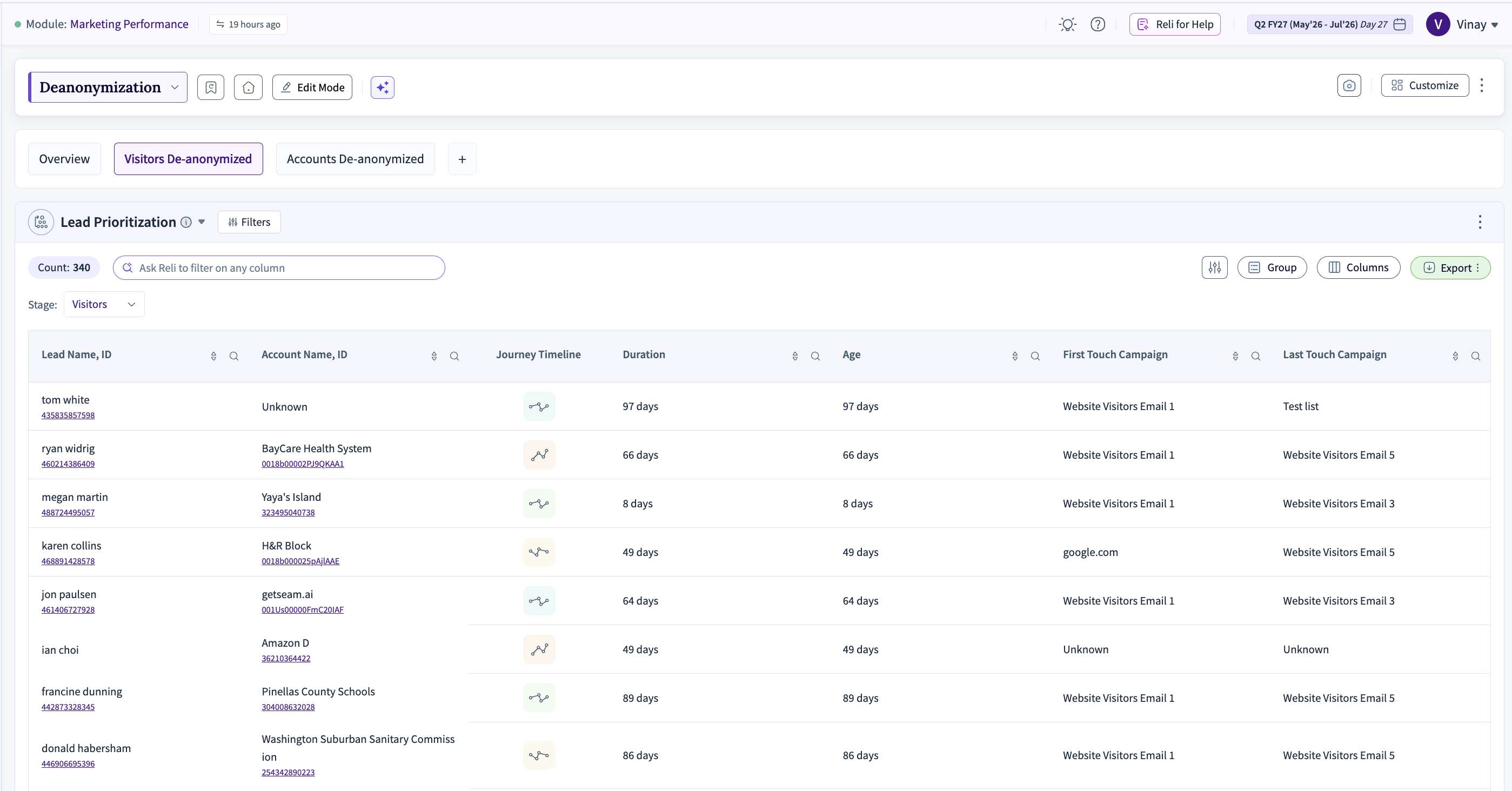
Persons De-anonymized Table / List
Purpose: Shows the individual leads / persons whose identities were resolved, with details like lead name, account name, LinkedIn URL, journey timeline, age (in days).
Insight:
• Use filters (e.g. “true / false” for de-anonymized flag) to isolate which leads were resolved.
• The journey timeline and “age” help you see how long it took from first anonymous interaction to resolution.
• You may detect patterns: e.g. certain content or channels yield quicker de-anonymization.
Net-New Persons De-anonymized
Purpose: Focuses only on persons resolved for the first time in the period. It shows similar columns (lead → account mapping, timeline, etc.), but restricted to net-new resolvings.
Insight:
• Helps you exclude repeat or previously known persons and see your incremental resolution performance.
• If this number is flat or declining, it may suggest your pool of resolvable persons is saturating or your matching logic has gaps.
Tab De-anonymized Accounts

Visitor Accounts Revealed (Account-level Table)
Purpose: Lists accounts whose visitor traffic has been resolved (i.e. anonymous visitors mapped to an account), with columns such as account domain, industry, lead name (if resolved), journey timeline, etc.
Insight:
• Shows which accounts are “opening up” from anonymous traffic into known entities.
• Helps identify high-value accounts that are interacting before identity resolution.
• Use filtering (e.g. “Visitor Account De-anonymized: true”) to isolate only resolved accounts.
Net-new Accounts Identified
Purpose: Focuses on accounts that were newly resolved in the period (i.e. accounts not previously de-anonymized). It shows domain, timeline, account size / revenue buckets, etc.
Insight:
• This is your pipeline of new account-level intelligence—you can compare this to marketing / sales targeting to see if de-anonymization is giving you new targets.
• If many new accounts appear, your identity resolution is expanding coverage.
• If few, either your matching logic or data sources might need enhancement.
