The Contact Enrichment Agent in RevSure's Agent Hub is your personal AI-driven assistant to enhance and complete lead or contact data with minimal effort. Whether you're running outbound campaigns, cleaning up your CRM, or enriching MQLs before handoff, this agent brings third-party intelligence (via MixRank, People Data Labs, Linkedin ) right into your workflow.
This can be added to other workflows to create downstream use cases like enriching leads and sending personalized emails using the enriched data, sending enriched data as alerts on Slack among others.
How to Set It Up
You can configure two types of enrichment agents:
Manual Contact Enrichment (run on-demand)
Scheduled Contact Enrichment (runs automatically on a set schedule)
Both follow the same creation flow inside the Agent Builder. Here's a quick walkthrough:
Step 1: Agent Details
Name: e.g., "Scheduled Contact Enrichment"
Description: Describe what the agent does
URL Slug & Tag: Auto-generated or customizable fields to manage the agent entry
Step 2: Trigger Setup
Choose between:
Manual Only (you decide when to run it)
Scheduled Triggers (let the system run it regularly)
For Scheduled:
Choose Frequency: Daily / Weekly / Monthly
Select Time & Timezone
Step 3: Action Tasks
Here's where the agent does its magic:
Get User Input
Prompt: e.g., "Get the lead data created in the previous week"
Used to narrow down the enrichment target list
Run Process
Type: Contact Enrichment
Data Sources: MixRank and/or People Data Labs, Linkedin, Limadata
Mode: Delta Enrichment (to enrich only new or changed records)
Select enrichment fields
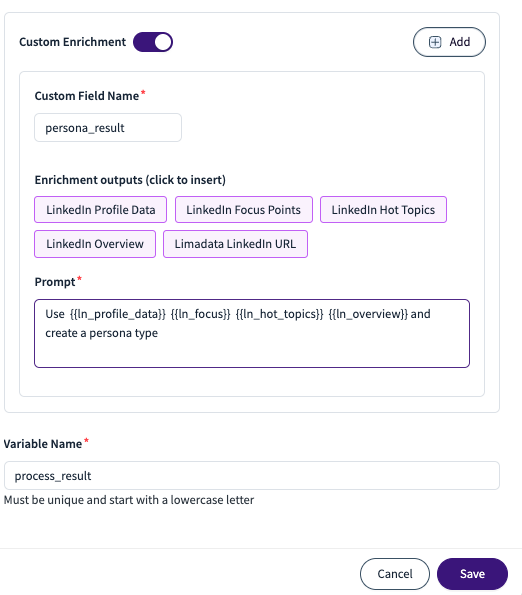
Add a custom enrichment
Send To
Optionally, send to another system or downstream action (e.g., HubSpot agent)
Write-back Node
Choose which enriched fields (emails, GitHub data, etc.) to update in the destination platform
Output Format
Visual display: Markdown table
Use dynamic variables from user input and process results
.png)
How can you use it?
Pre-campaign lead intelligence: Enrich contacts before running outbound sequences
CRM Clean-up: Automatically patch missing fields in Salesforce or HubSpot
Weekly SDR Reports: Auto-run enrichment every Friday to feed Monday follow-up lists
Prospect Profiling: Add GitHub, social or email metadata to better segment and prioritize
Why you need this?
This agent:
Removes the need for third-party enrichment tools
Brings all the logic and enrichment into one connected flow
Saves SDRs and RevOps teams hours of work every week
Ensures cleaner, actionable data inside your GTM tools