1. OAuth Authorization Flow & Connected App
Revsure’s Salesforce integration leverages the OAuth 2.0 framework to securely access customer data via a Connected App that is created and managed within Revsure’s own Salesforce org.
This follows the standard multi-tenant SaaS integration model, where a single Connected App is defined by the provider and reused across multiple customer orgs.
When a customer authorizes Revsure, they are granting this existing Connected App permission to access their data—no new app is created within their Salesforce environment. This approach ensures scalability, centralized configuration management, and a consistent security model across all integrations.
Authorization Flow
User initiates connection from Revsure
User is redirected to Salesforce login page
User reviews and approves requested permissions
Salesforce generates:
Access Token (short-lived, used for API calls)
Refresh Token (used to obtain new access tokens)
Revsure securely stores these tokens
Connected App Configuration
Setting | Value |
|---|---|
OAuth Scopes | Access the identity URL service (id, profile, email, address, phone) Manage user data via APIs (api) Perform requests at any time (refresh_token, offline_access) |
Callback URL | https://gw.revsure.cloud/data-hub/v1/oauth/callback https://gw.revsure-eu.cloud/data-hub/v1/oauth/callback |
Refresh Token Policy | Valid until revoked |
Visibility & Control for Customers
After authorization, Revsure appears in Salesforce under:
• Setup → Connected Apps → OAuth Usage
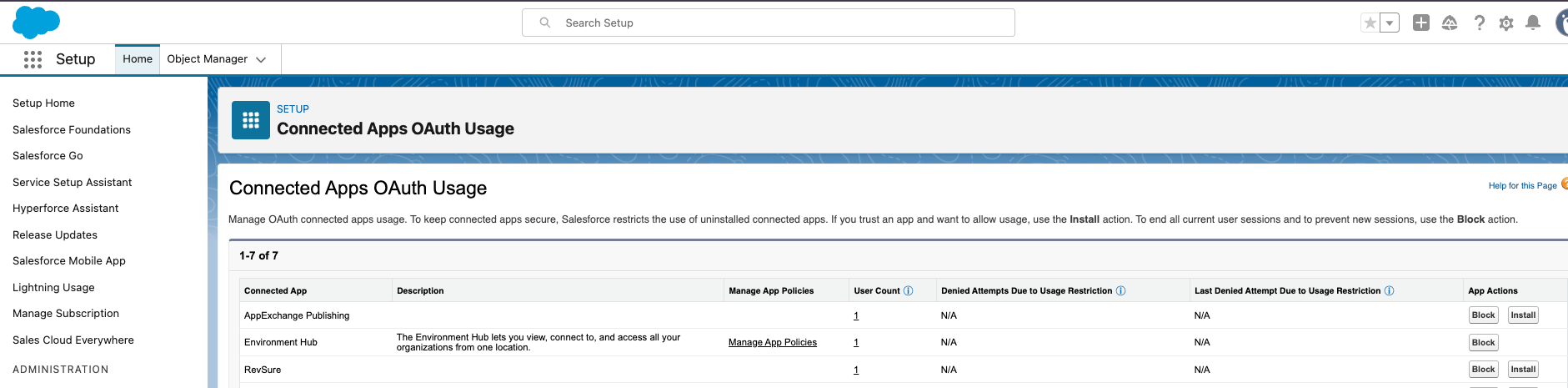
Customers can:
• View authorized users and sessions
• Revoke access at any time
• Block the application if required
Revsure leverages Salesforce OAuth to securely access data across multiple customer orgs. Access is granted explicitly by users, governed by defined scopes, and can be revoked at any time—ensuring a secure and transparent integration model.
2. Integration User Permissions
Object-Level Access
The integration user requires READ access to the following Salesforce objects:
Category | Object Details |
|---|---|
Core CRM Objects | Account, Contact, Lead, Opportunity, Campaign, CampaignMember, User, Product2, RecordType |
Pipeline Objects | OpportunityLineItem, OpportunityStage, OpportunityPartner, OpportunityContactRole, Period, ForecastingFact, ForecastingItem, ForecastingType |
History Objects | LeadHistory, OpportunityHistory, OpportunityFieldHistory, AccountHistory, CampaignHistory, ContactHistory |
Other Objects | Task, Event, EmailMessage, EmailMessageRelation, LeadStatus, CampaignInfluence, UserRole |
Custom Objects | <Any custom object required for reporting> |
Field-Level Access
By default, the integration user is expected to have READ access to all fields on the above objects, including:
All standard fields (Id, Name, CreatedDate, LastModifiedDate, SystemModstamp)
All custom fields
Any UTM tracking parameters (utm_source, utm_medium, utm_campaign, utm_content, utm_term)
Currency fields (if multi-currency is enabled)
System Permissions Required
API Enabled
View All Data (or configure appropriate sharing rules)
While RevSure requires READ access to all fields to enable quick ingestion of custom objects and custom fields for reporting, the following document lists all the standard Objects and Fields that are required by the standard mapping.
3. Data Access Scope & Usage
Revsure performs read-only data extraction from Salesforce
No create/update/delete operations are performed unless explicitly enabled
Data is accessed strictly for:
Reporting
Analytics
Attribution modeling
Access is limited by:
OAuth scopes
The permissions of the authorized Salesforce user
4. Token Management & Security
Access tokens are short-lived and automatically rotated
Refresh tokens are stored securely using encryption at rest
Tokens are never exposed in logs or client-side systems
If access is revoked in Salesforce:
Tokens immediately become invalid
API access is terminated
References
Salesforce Authorization Through External Client Apps or Connected Apps and OAuth 2.0